
Responsive Addons for Elementor Review – A Multipurpose Elementor Addon
Are you an Elementor user? If yes, you must check out this article on Responsive Addons for an Elementor review.
Elementor, as well known, is a powerful WordPress page builder plugin that allows you to create and customize a WordPress website. To enhance the capabilities of the page builder, Elementor and other third parties offer various add-ons that improve its functionality.
This article will review a free yet powerful third-party plugin: Responsive Addons for Elementor. It offers over 80+ widgets that help you easily build a functional and interactive website. So let’s start without further ado.
Table Of Contents
- Competitor Comparison: Responsive Addons for Elementor vs Others
- What Are Addons for Elementor?
- What are Responsive Addons For Elementor Plugin?
- Key Features – Responsive Addons For Elementor Review
- Performance Test Of RAE
- Classification of Widgets Offered and Their Functionality
- Benefits of Using Responsive Addons for Elementor Plugin
- How To Download and Use Responsive Addons For Elementor Plugin
- Responsive Addons for Elementor Plugin – Pros And Cons
- Responsive Addons for Elementor Review – Support
- How To Reach Out To Cyberchimps Support Team
- FAQs
- Conclusion – Responsive Addons For Elementor Review
Competitor Comparison: Responsive Addons for Elementor vs Others
| Feature | Responsive Addons for Elementor | Plus Addons for Elementor | ElementsKit | Exclusive Addons |
|---|---|---|---|---|
| Widget Count | 80+ (Free) | 120+ (Free + Pro) | 90+(Free + Pro) | 100+(Free + Pro) |
| Template Library | 250+ ready templates | 100+ templates | Moderate | Moderate–High |
| Theme Builder | ✅ Free | ❌ Pro only | ✅ Yes | ⚠️ Limited |
| Customization Options | High | High (Pro unlocks more) | High | High |
| Performance | Lightweight, optimized | Moderate | Moderate | Optimized (on-demand loading) |
| Ease of Use | Beginner-friendly | Beginner to advanced | Intermediate | Intermediate |
| Pricing | Completely Free | Free + Paid plans | Free + Paid plans | Free + Paid plans |
| Best For | Beginners, performance-focused sites | Advanced designs & widgets | Full site building | Designers & agencies |
Responsive Addons for Elementor is the Best Elementor Addons plugin – Get it for free!
What Are Addons for Elementor?
Before we dive into the review, let’s start by getting a basic understanding of Elementor and its addons. As we all know, Elementor is a powerful WordPress page builder plugin for creating and editing websites.
However, the plugin is not completely free for building a fully functional website. Undoubtedly, Elementor offers functional widgets and interactive addons, but it provides basic customization and styling options. This is why you need additional extensions.
Addons for Elementor are third-party plugins that offer additional functionalities, features, and customization options to the Elementor page builder.
These addons are developed by various vendors and the Elementor community to enhance the capabilities of the core Elementor plugin. Alongside, they help in creating sophisticated, feature-rich, and visually stunning websites.
What are Responsive Addons For Elementor Plugin?

📢 My Real-World Test Results:
- Number of widgets: 80+
- GTmetrix Performance Score: 100%
- Includes Cross-site Copy-paste feature
- 5+ Extensions like Scroll animations, Sticky Section, Page Duplicator, & more.
- Save design time with 100+ Premium-grade Starter templates
Well, now we know what Addons for Elementor are, let’s understand what Responsive Addons for Elementor.
Responsive Addons for Elementor, developed by Cyberchimps, is a multipurpose plugin that offers more than 80 powerful and interactive widgets that enable you to enhance the functionalities of the Elementor page builder plugin.
It offers a comprehensive suite of features that make it easy to control how your website looks and functions across different devices. The plugin offers various widgets that enable you to fine-tune the appearance of your website with device-specific styling options.
It also offers a range of responsive widgets that automatically adapt to different screen sizes, ensuring that your content remains visually appealing and easy to interact with on any device.
Key Features – Responsive Addons For Elementor Review
The Responsive Addons for Elementor provide users with plenty of features. Let’s explore each one carefully:
1. Huge Widget Library
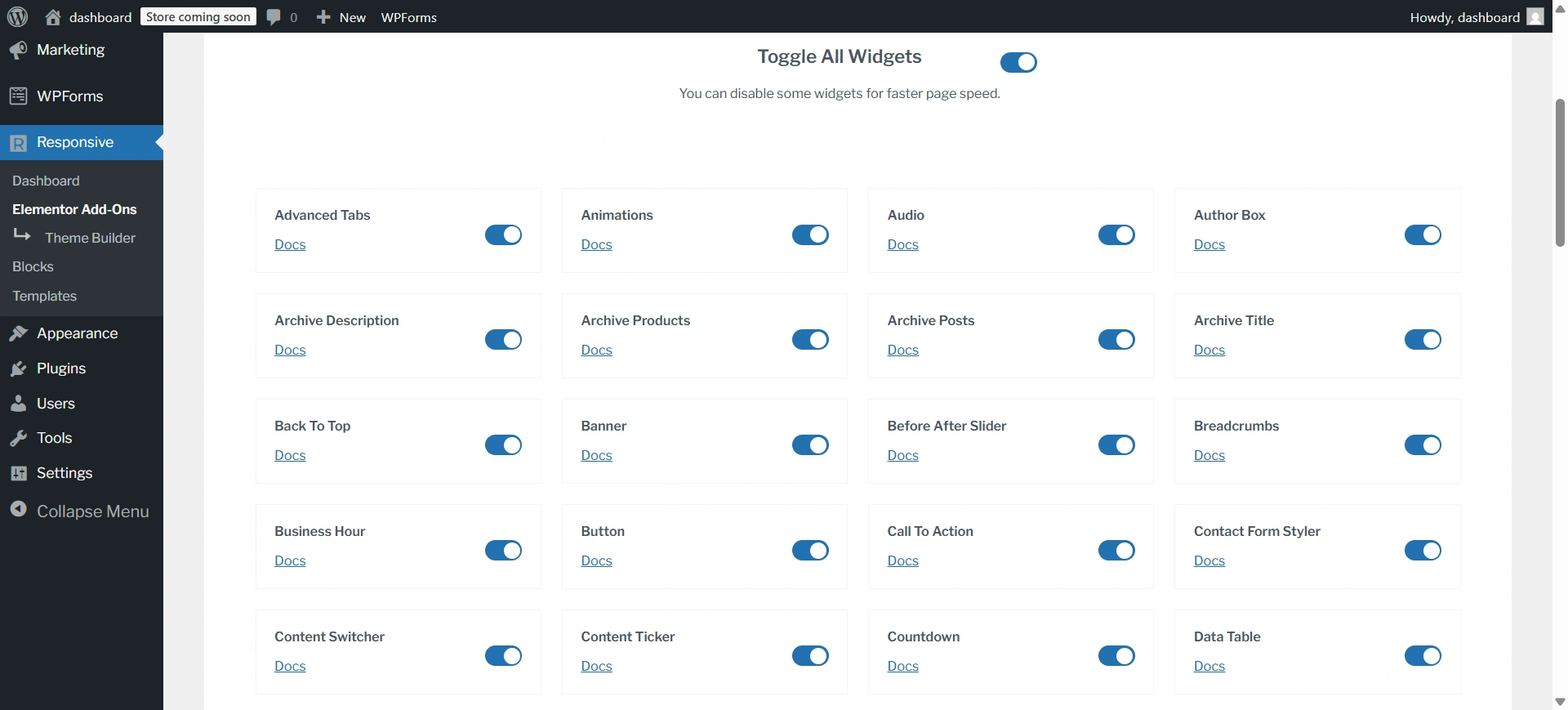
Responsive Addons for Elementor provides over 80 custom widgets that work smoothly with the Elementor page builder. This vast widget collection enables users to construct complicated and visually beautiful layouts without requiring other plugins. Furthermore, it improves the website-building process and offers a consistent user experience.
2. Responsive Widgets
The plugin offers a wide range of responsive widgets that automatically adjust their appearance and functionality based on the user’s device. These include responsive image carousels and galleries that seamlessly adapt to deliver an optimal user experience on any screen size.
3. Device-Specific Customization
Responsive Addons for Elementor allows you to independently control the styling and layout of your website elements. This detailed editing feature ensures that your content and design adaptively cater to the unique needs and viewing preferences of users on various devices.
4. Breakpoint Management
The plugin enables you to define custom breakpoints and control your website’s layout and design based on specific screen widths. This ensures that your website maintains its visual integrity and functionality across a diverse range of devices.
5. Custom CSS Integration
For experienced users, the plugin provides the ability to add custom CSS, allowing for deeper customizations. This enables the flexibility to address any unique responsive design challenges that may arise, ensuring your website is tailored to perfection.
6. Performance Optimization
The widgets provided by Responsive Addons for Elementor are performance-oriented, guaranteeing that your website loads quickly and efficiently. The plugin optimizes asset loading, reduces the impact on page speed, and works seamlessly with Elementor’s own performance optimization capabilities, providing a comprehensive solution for producing fast-loading, responsive sites.
7. User-Friendly Interface
The plugin boasts an intuitive and well-designed interface, making it accessible to all users. The straightforward controls and visual previewing options simplify the process of creating responsive designs, allowing you to focus on crafting stunning and engaging websites with ease.
Performance Test Of RAE
Performance Test Result of Responsive Addons for Elementor
For the Responsive Addons performance test, I have installed only the RAE plugin on a vanilla website. After that, I added a countdown widget and conducted the performance test using GTmetrix.

Overall, the GTmetrix results highlight that Responsive Addons for Elementor is a performance-friendly plugin, making it a solid choice for speed-focused websites.
Classification of Widgets Offered and Their Functionality
| Category Of Widget | Functionality |
|---|---|
| Content Widgets | These widgets focus on enhancing the overall usability and interactivity of your website. |
| Form Widgets | Enable you to create and customize various forms for your website. |
| Marketing Widgets | Help you present your content in engaging and visually appealing ways. |
| Creativity Widgets | Add a touch of creativity and animation to your website design. |
| WooCommerce Widgets | Specifically tailored for users with WooCommerce-powered online stores. |
| WooCommerce Product | Provide a versatile set of tools for showcasing your products on your WordPress website. |
| SEO Widgets | Help optimize your website content for improved search engine visibility. |
| Posts Widgets | Enable you to showcase your blog posts and other content in creative ways. |
Benefits of Using Responsive Addons for Elementor Plugin
- Save Time and Effort: With pre-designed templates and customizable widgets, you can create stunning websites in less time.
- Enhance Website Design: Responsive Addons offers many design options to help you create a unique and visually appealing website.
- Improve User Experience: Improve user experience with features like sticky elements, parallax scrolling, and smooth animations.
- Boost Engagement: Use eye-catching elements and interactive features to engage your visitors and encourage them to stay on your website longer.
- Expand Website Functionality: Add new features and capabilities to your website with an extensive collection of widgets and templates.
How To Download and Use Responsive Addons For Elementor Plugin
The multi-functional widgets offered by Responsive Addons for Elementor are not only highly effective but also very easy to download and use. To install the plugin, follow these simple steps:
Navigate through your WordPress Admin dashboard and go to Plugins > Add New Plugin.
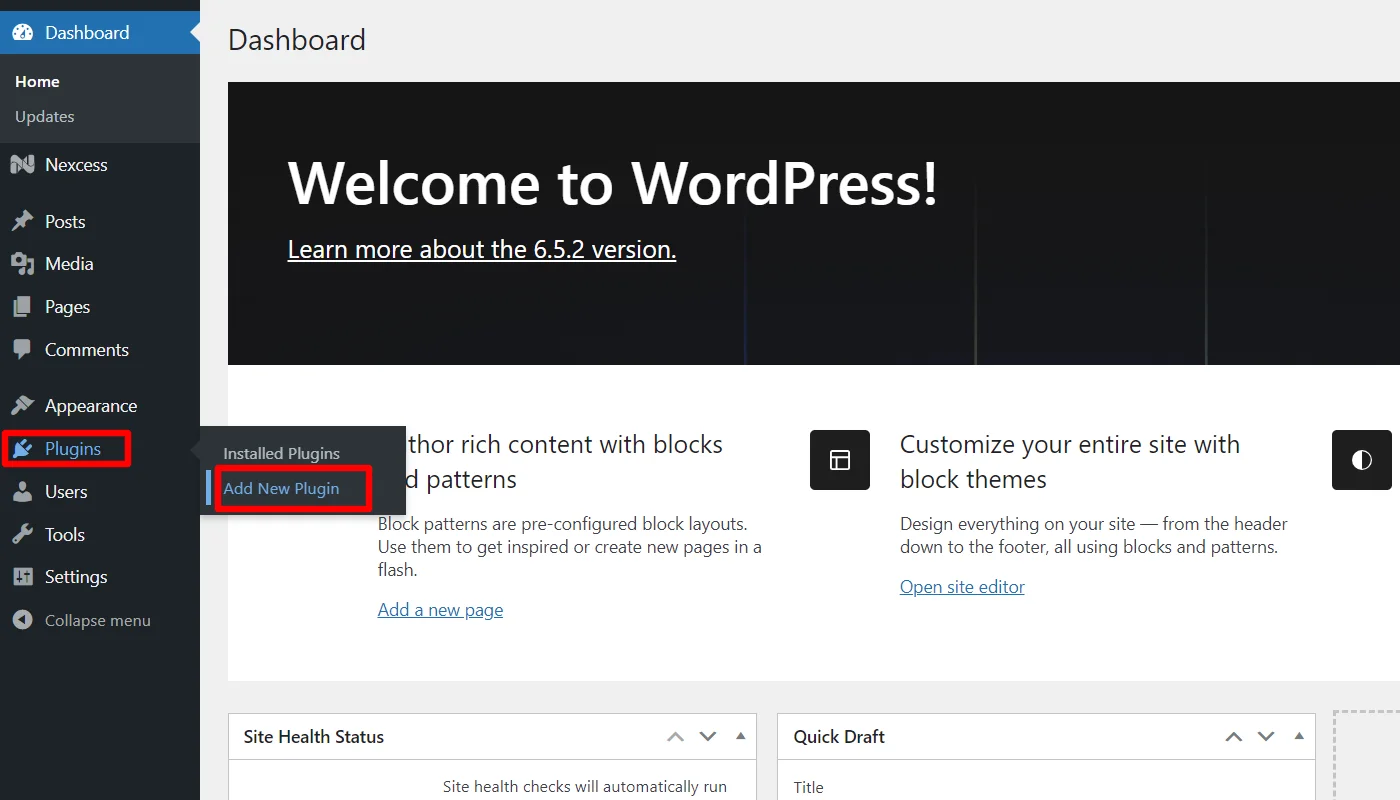
Go to the search plugin and search for responsive addons for Elementor. Next, click on Install Now and download the plugin.

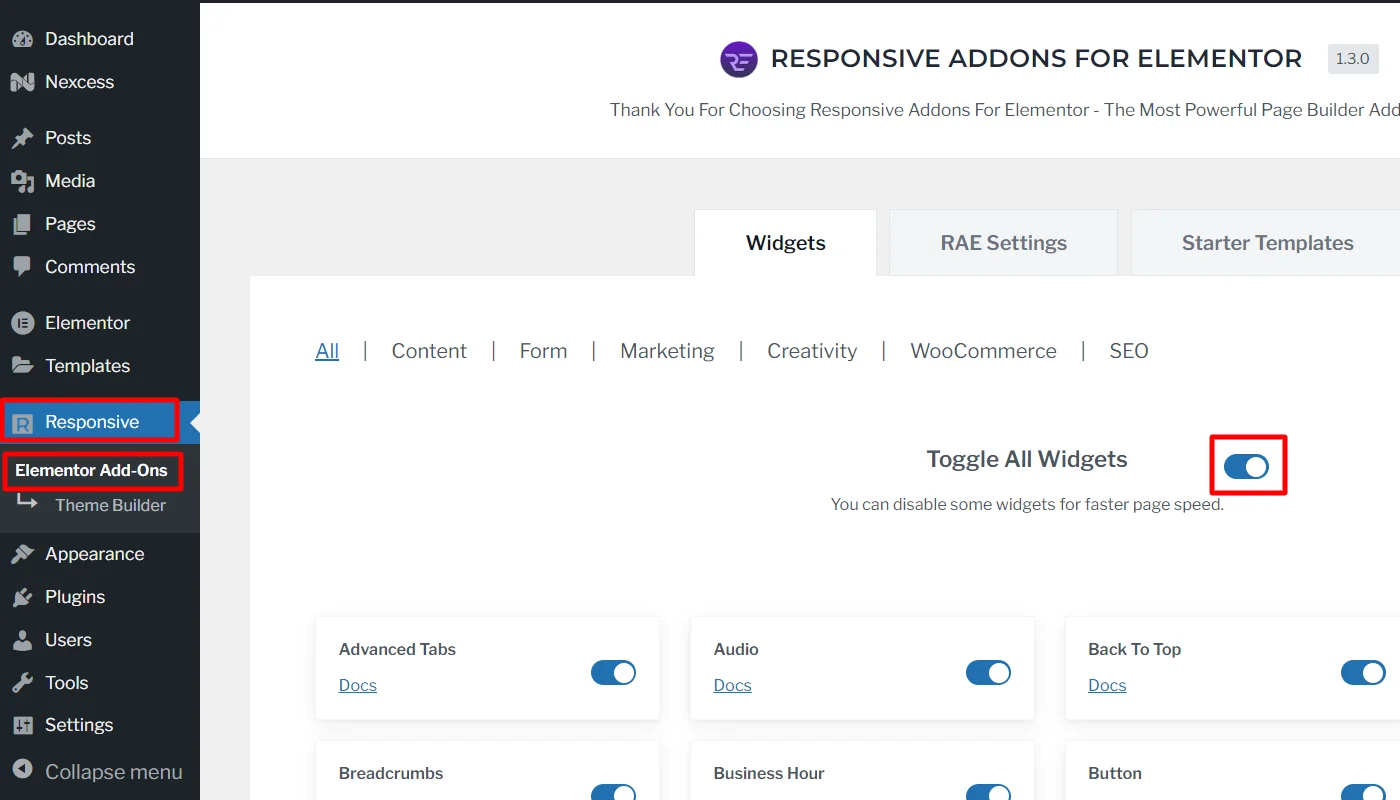
Once the plugin is active, you can use the widgets. To do so, navigate to the WordPress admin dashboard, click RAE, and Toggle All Widgets.
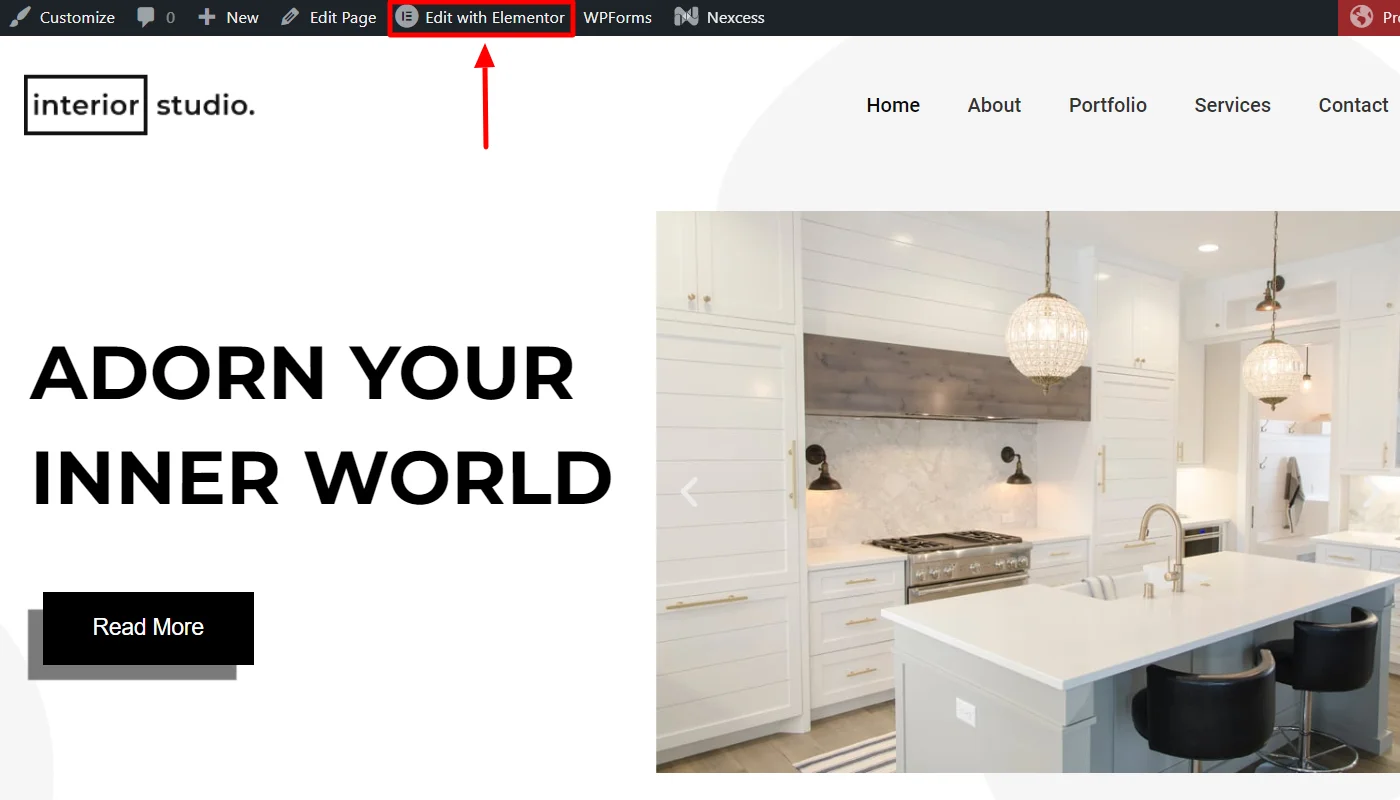
Next, open the page wherever you want to add the widgets and click Edit with Elementor.
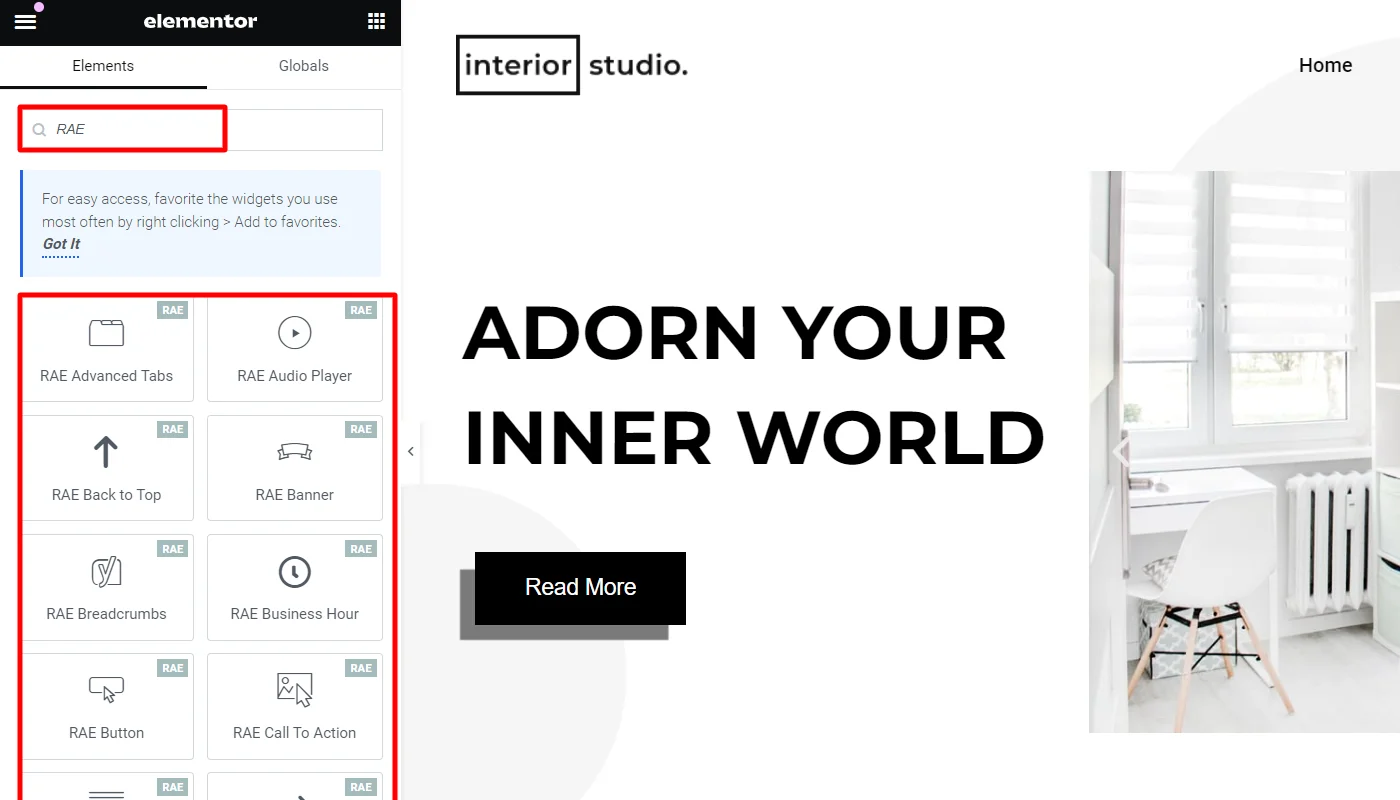
To add any Responsive Addons for Elementor widget on the page, search RAE in the search widget bar.
Customizing Responsive Addons for Elementor Widgets
Let’s learn how to customize Responsive Addons for Elementor widgets. We’ll use one widget as an example, but the process is similar for all others. While customization options may vary, the process is always the same.
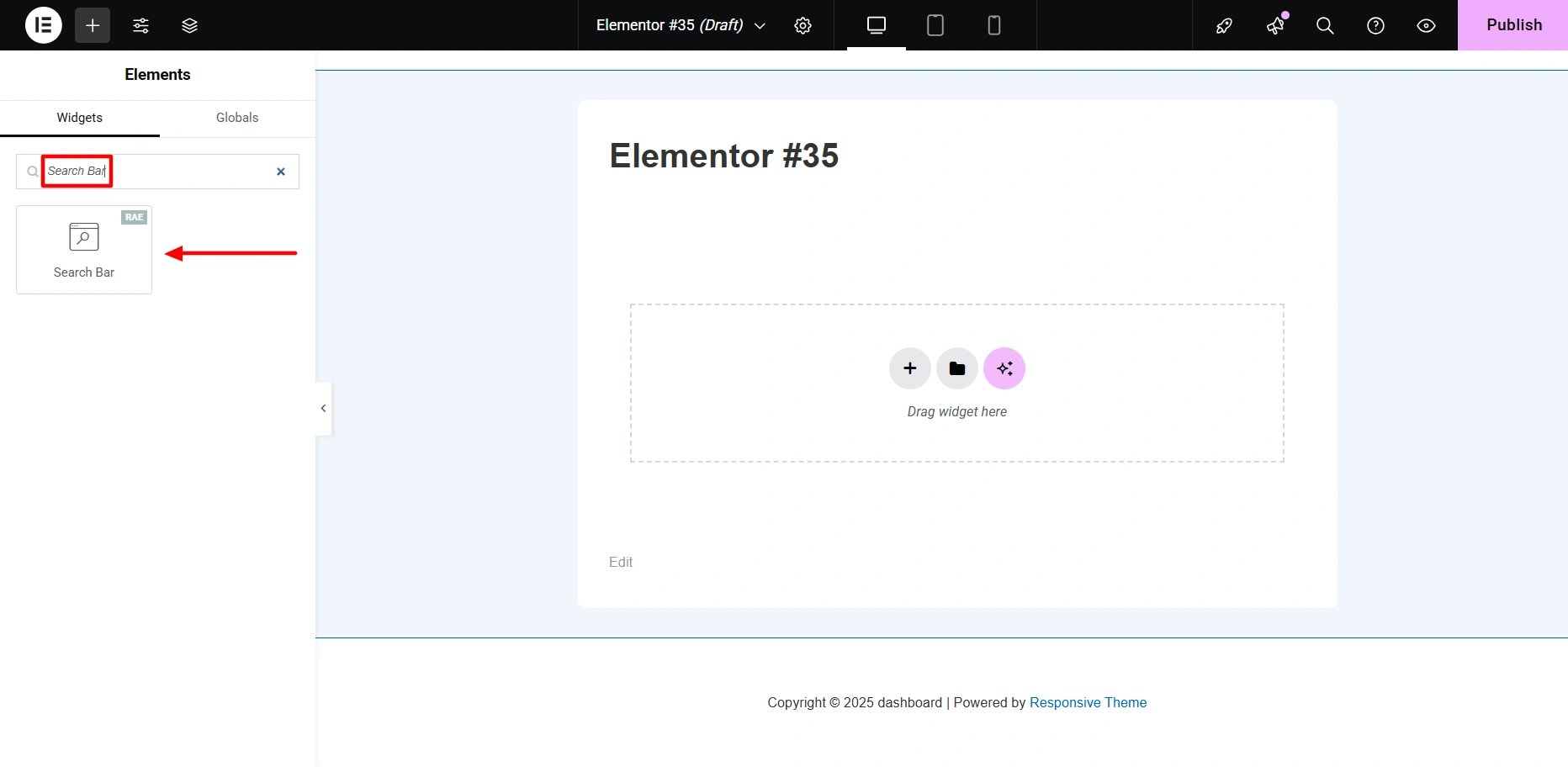
In the search bar, type Search Bar. Then, drag and drop the widget onto the page to seamlessly integrate it into your design.
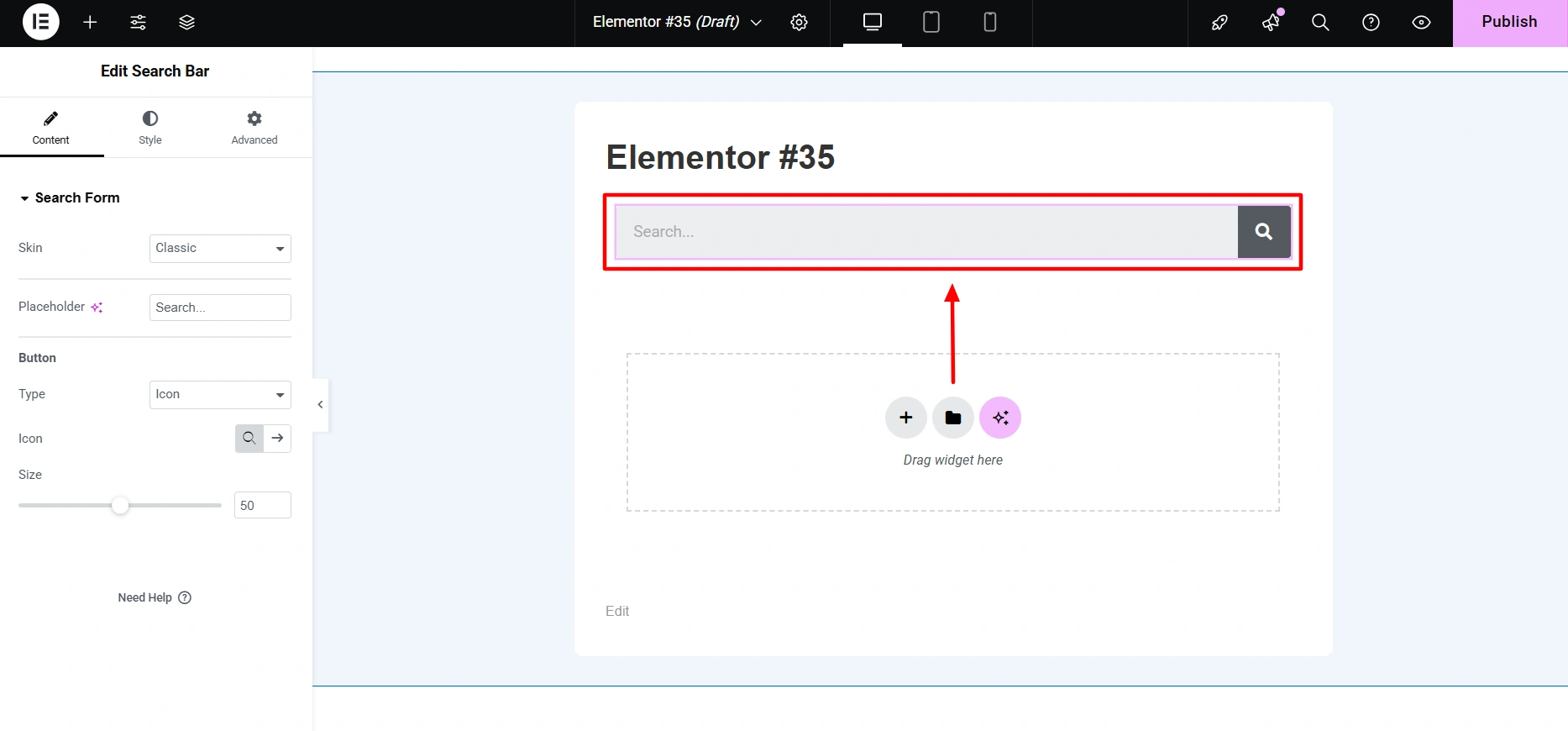
Once you place it on the desired page, you’ll see how it looks by default.
And this is how your search bar will appear after the customization:
If you want to learn how to customize the search bar, refer to our detailed guide.

To create a pricing table with Elementor. Drag and drop the Pricing Table widget in the Elementor editor.

You can customize it to match your specific needs and create layouts like the one shown above. If you want to learn how to customize a pricing table, refer to our detailed guide.

After customizing the widget, click Publish in the top right corner.
You can follow the same steps to customize other widgets and make your website unique.
Extensions in Responsive Addons For Elementor
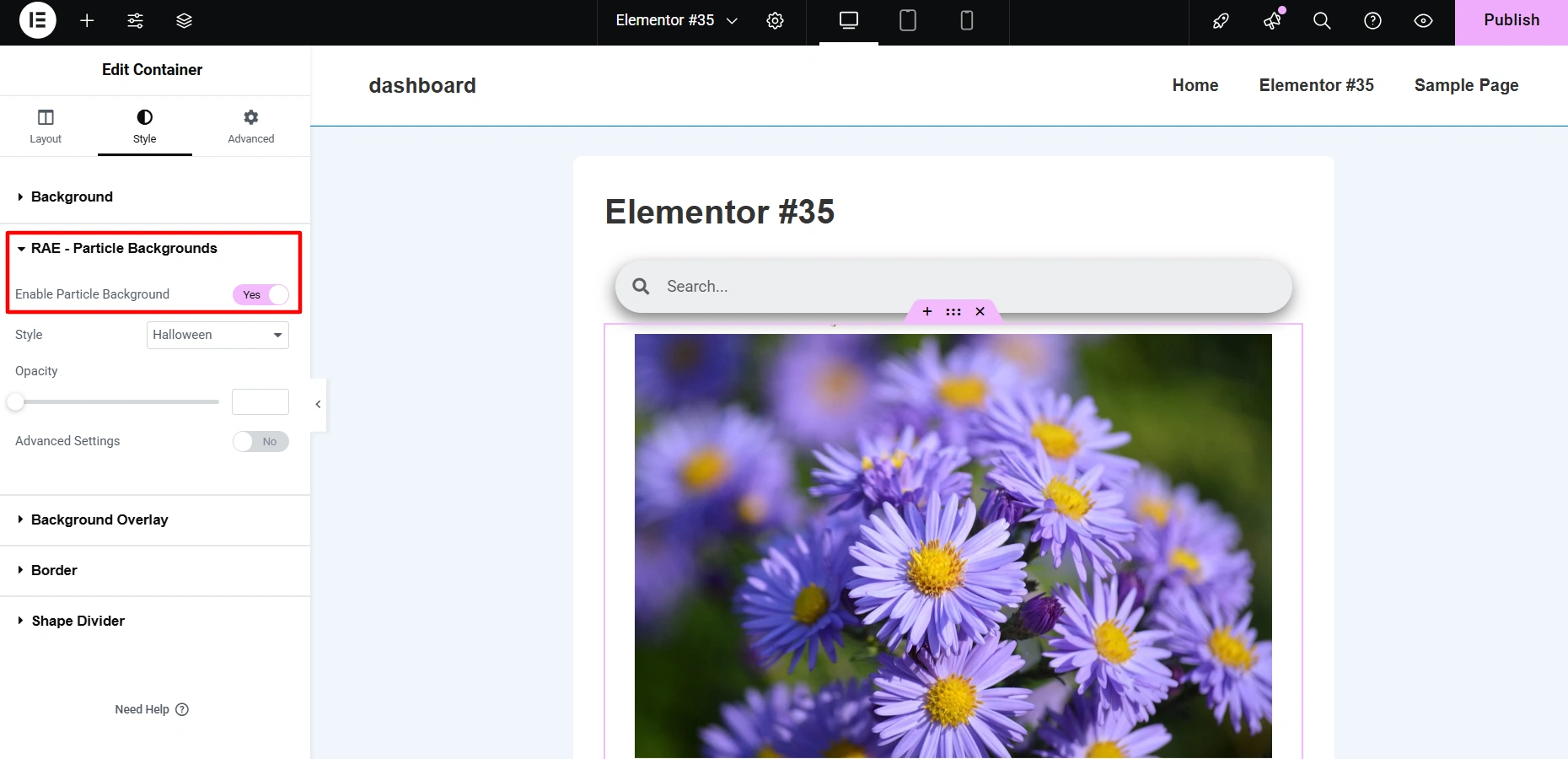
Particle Backgrounds: You can add visually appealing particle effects to your website with Particle Backgrounds extension.
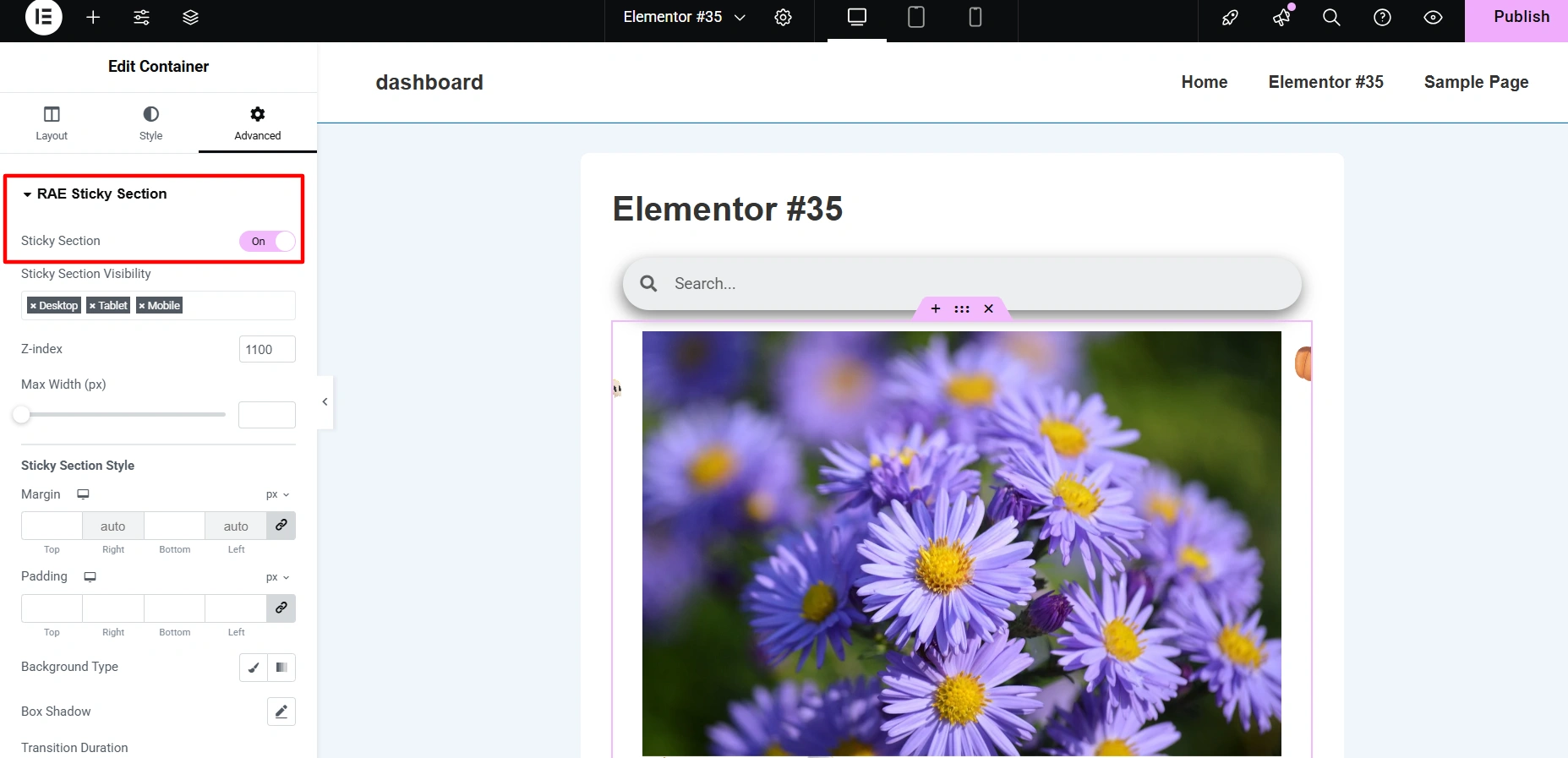
Sticky Section: If you want a specific section on your website to be fixed on the screen while you scroll, Sticky Section can come handy.
Duplicator: With the RAE Duplicator you can copy any post type with just one click. This is helpful when you want to reuse a layout or create similar posts without starting from scratch.

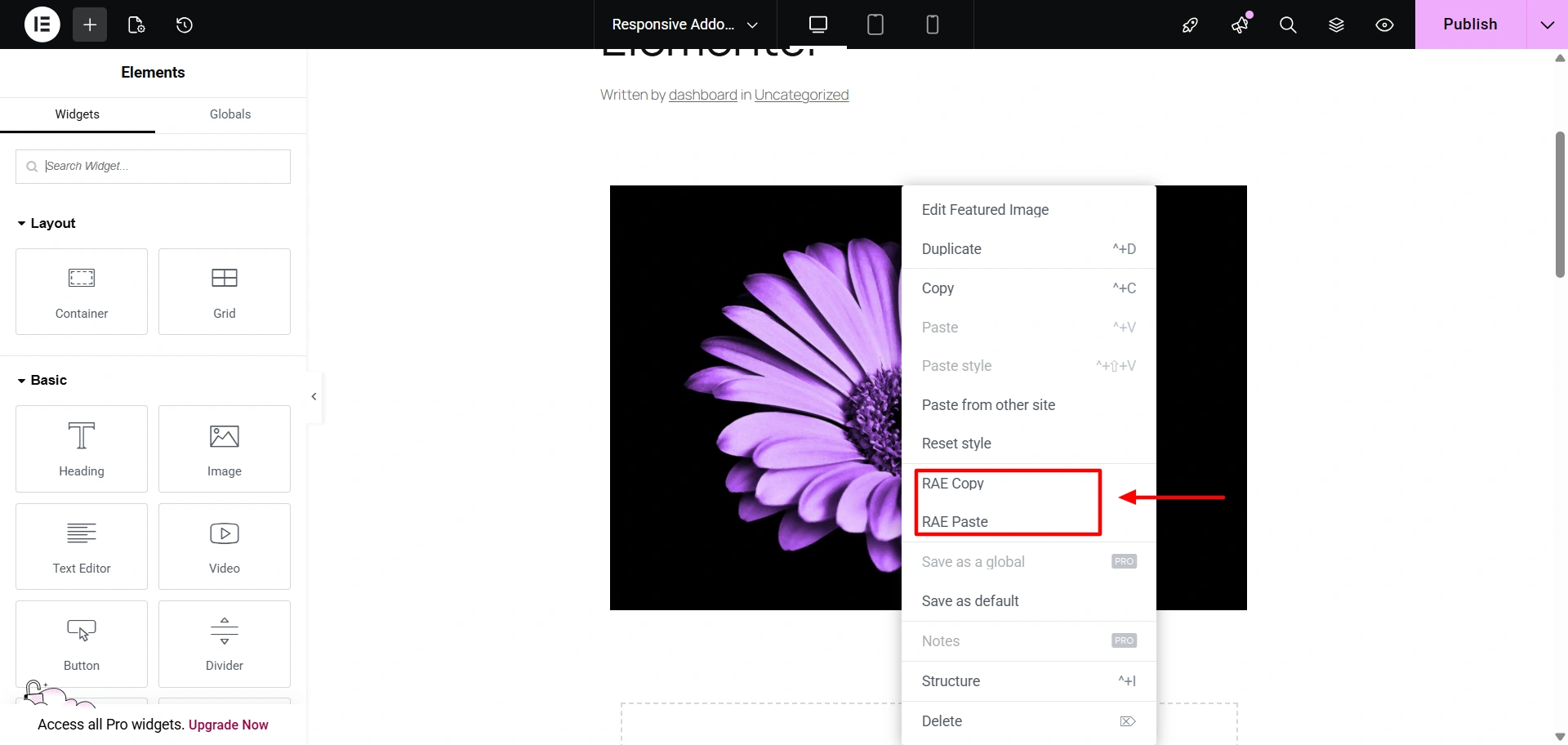
Cross-Site Copy Paste: This feature lets you easily replicate sections from one website to another. It will not only save your time but also copy every element on your website in no time.
Responsive Addons for Elementor Plugin – Pros And Cons
Undoubtedly, Responsive Addons for Elementor is a very powerful plugin. However, it also has its limitations. Let’s now discuss in detail the pros and cons of the plugin:
| PROS | CONS |
|---|---|
| Enhances responsiveness and mobile-friendliness of Elementor designs. | Depending on the usage of the plugin, there might be a few potential improvements. |
| Expands Elementor’s functionality with new widgets and features. | Depends on Elementor for functioning. |
| Saves time with pre-built templates and design elements. | |
| Seamlessly integrates with the Elementor interface. | |
| Receives regular updates to keep up with the latest web design trends and Elementor developments. |
Responsive Addons for Elementor Review – Support
Based on the experience we had while using the Responsive Addons for Elementor plugin, it was seamless. However, we faced some confusion while customizing a few widgets, but all our queries were instantly resolved.
The Responsive Addons team offers responsive and helpful customer support to assist users and tries to provide a hassle-free solution to its users. It allows users to access support through various channels, including support tickets, email, video tutorials, and comprehensive documentation.
Furthermore, the support team aims to provide the best services with prompt and accurate responses to user inquiries. This ensures that any problems faced by users are addressed in a timely manner.
Moreover, the team keeps working on regular updates. This enables the plugin to maintain compatibility with the latest versions of Elementor and WordPress, ensuring a seamless user experience.
How To Reach Out To Cyberchimps Support Team
To reach out to the support team, you can follow the follow the following steps:
Navigate to the WordPress admin dashboard and click Responsive > Add-Ons.
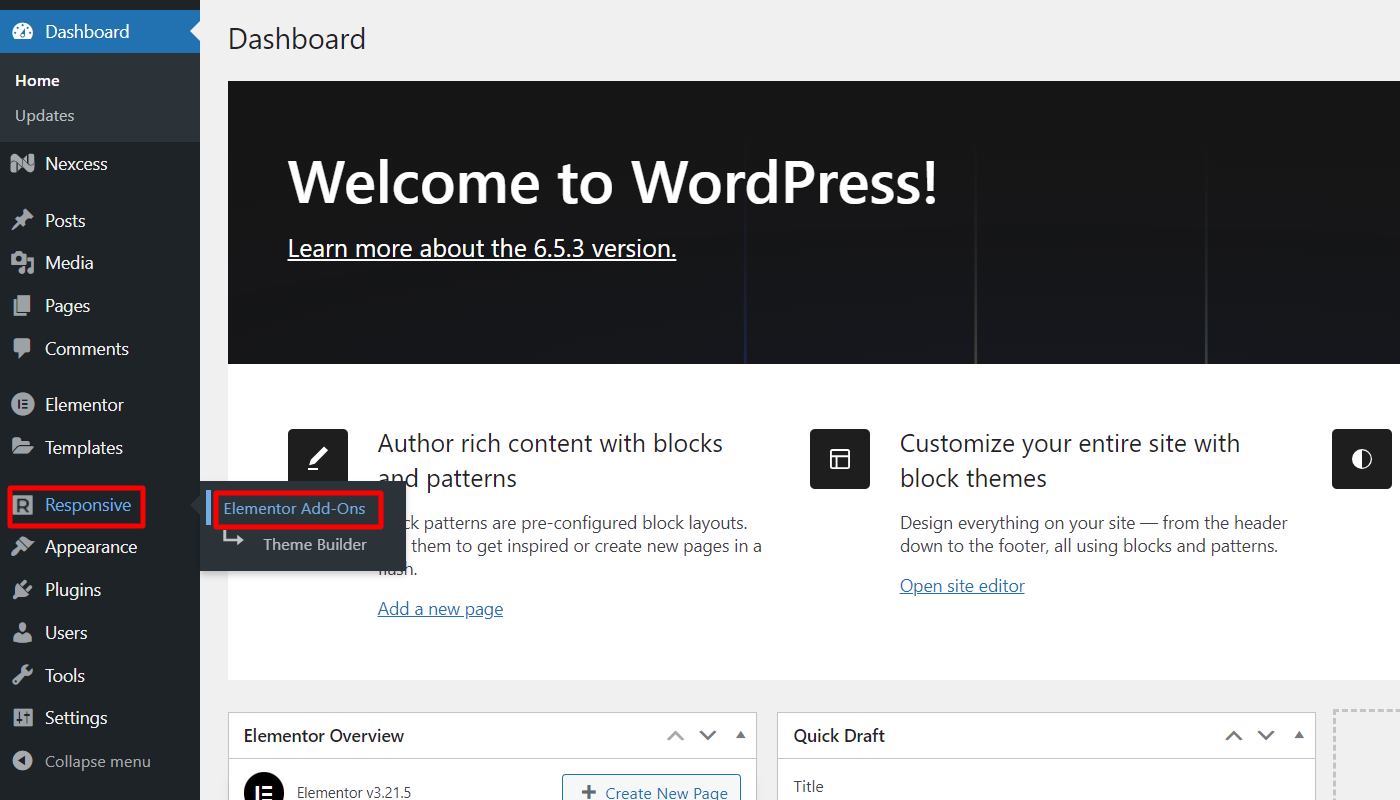
This redirects you to the Responsive Addons page, where you can toggle and activate all the widgets offered. Here, you can click on Docs of any widget to visit the documentation support.
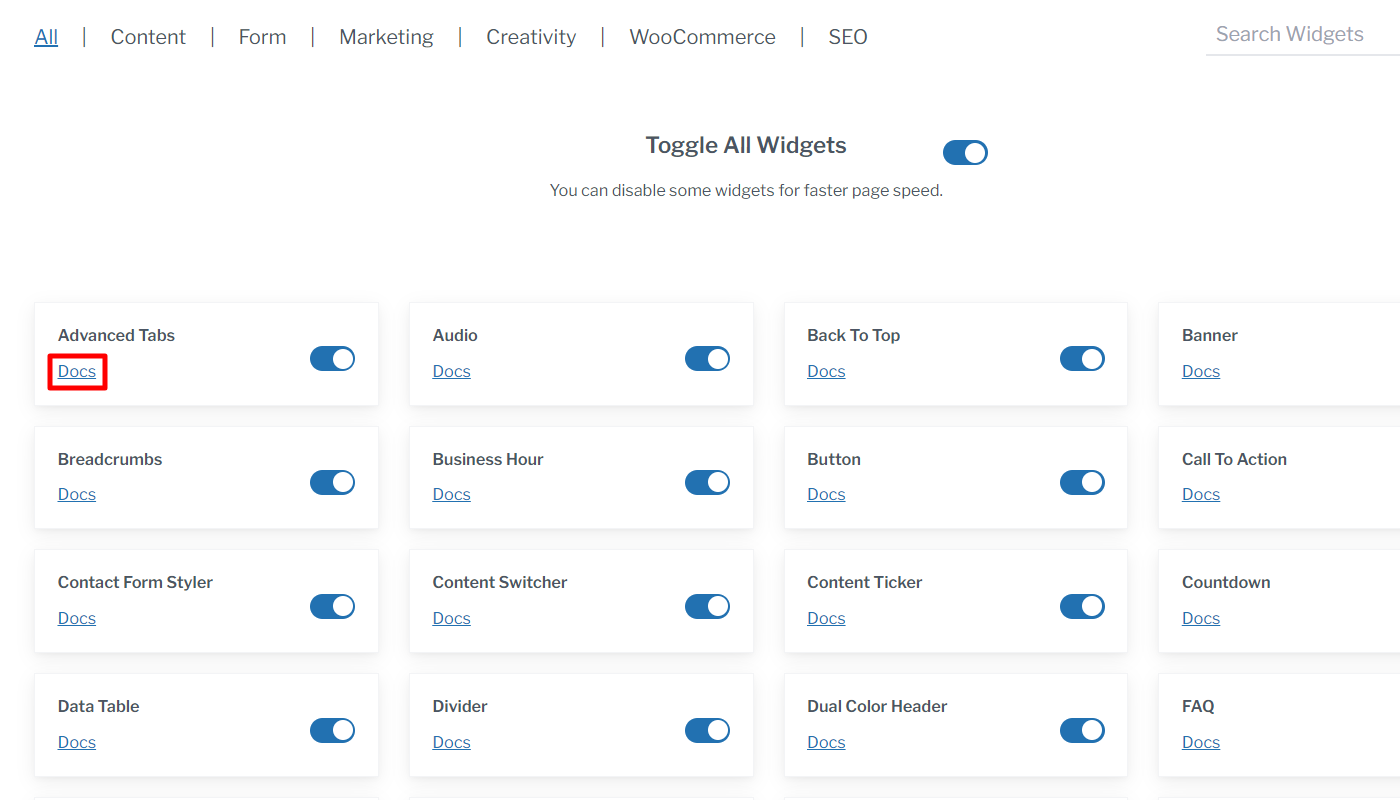
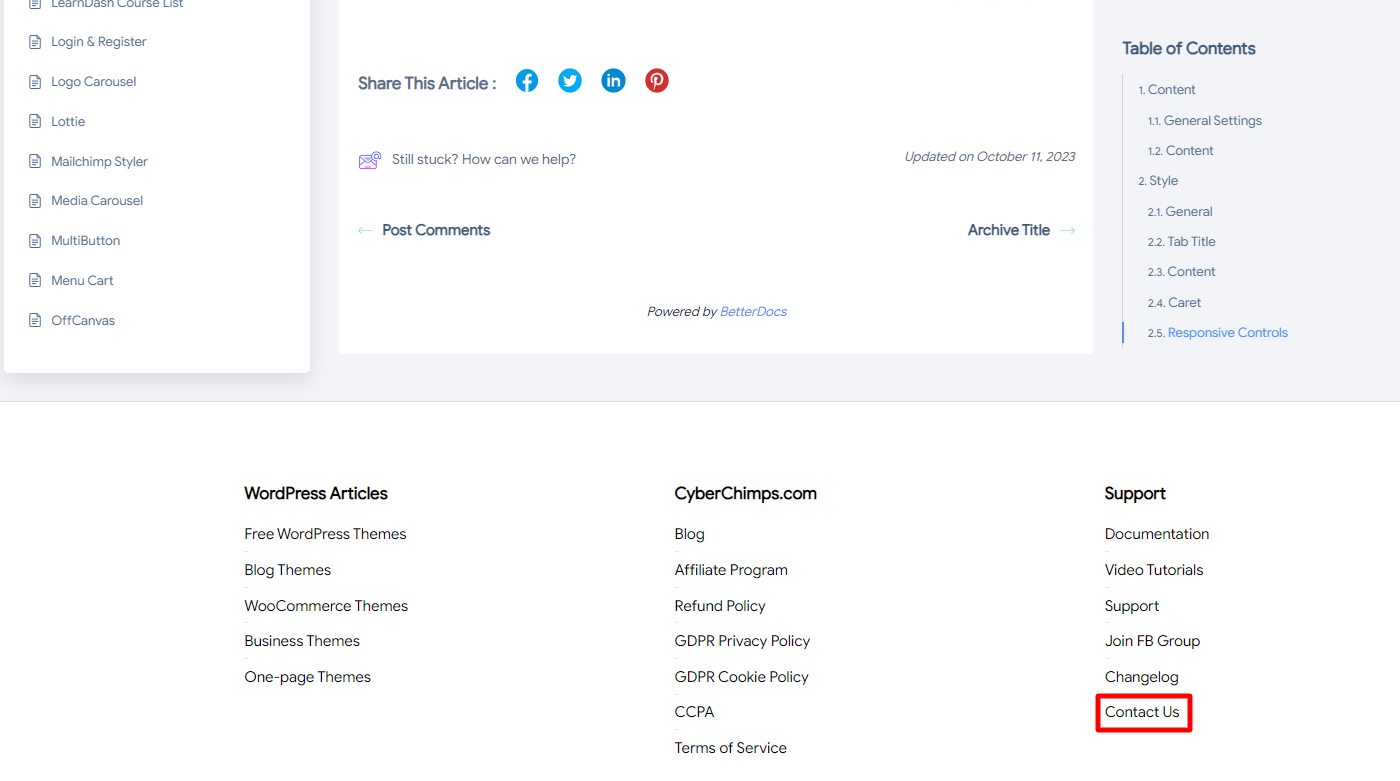
Once you land on the documentation page, you can read about the detailed usage of the widget. If this does not help you out, scroll down to the page footer and click Contact Us.
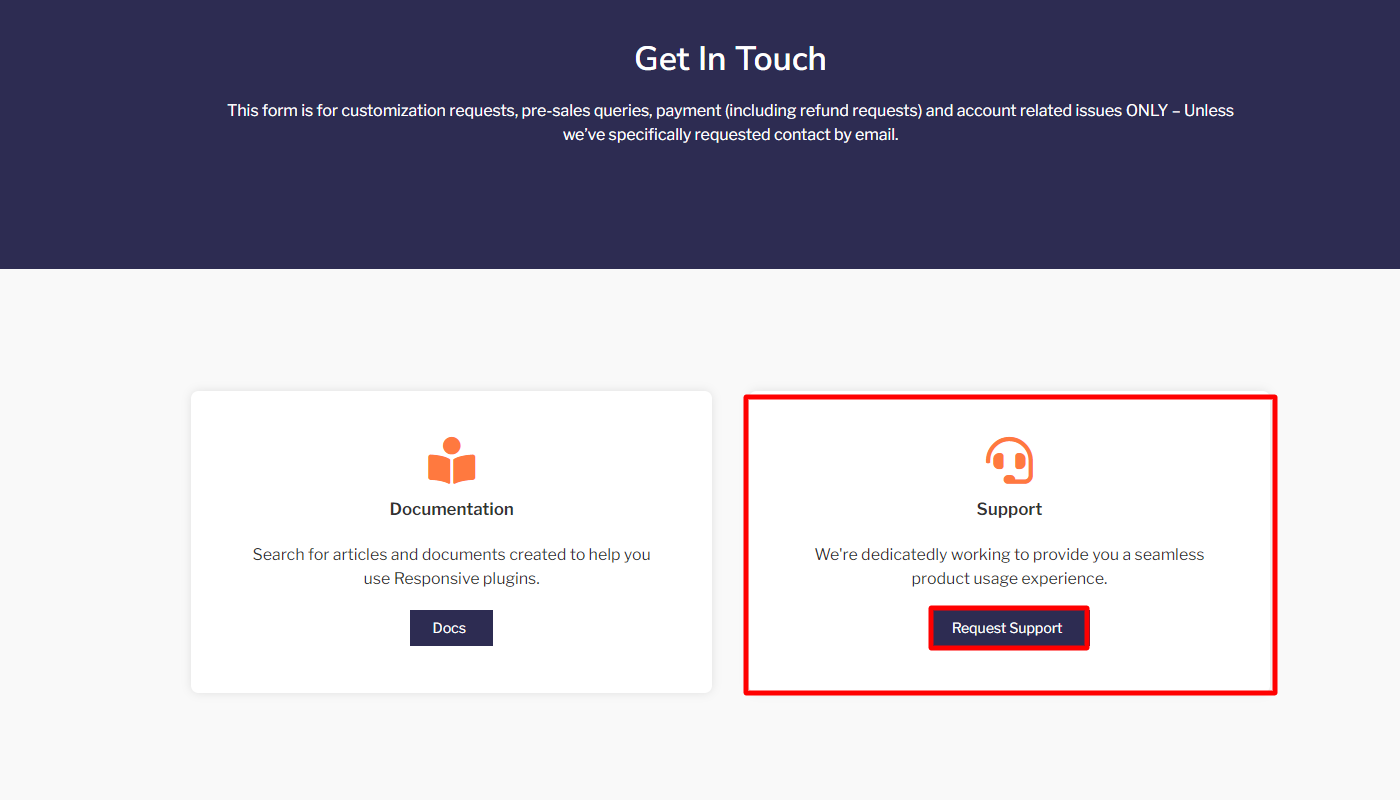
Next, click on the Request Support button to raise a support ticket.
Now, fill in the details required with your issue in the description, and Submit Ticket.

You can also directly mail the support at [email protected]
Overall, the support team is committed to providing high customer satisfaction. With a focus on addressing user needs and continuously improving the plugin based on feedback, it aims to provide you with the best possible experience.
FAQs
Is Responsive Addons For Elementor A Free Plugin?
Yes, Responsive Addons for Elementor is a Free WordPress plugin that enhances the capabilities of Elementor Page Builder. It offers over 80 free widgets that offers advanced customization to build an interactive website.
What Category Of Widgets Does Responsive Addons For Elementor Offer?
Responsive Addons for Elementor offers various widgets for all purposes. These widgets are classified into content widgets, form widgets, marketing widgets, creativity widgets, WooCommerce widgets, WooCommerce product widgets, SEO widgets, and posts widgets.
How To Use The Responsive Addons for Elementor Widgets?
To use the Responsive Addons for Elementor follow these steps:
- Install & Activate the Responsive Addons For Elementor plugin.
- Open the page where you want to add widgets.
- Drag and drop the widget you want to add in the page editor.
- Customize & style the widget as per your requirements and update the page.
Conclusion – Responsive Addons For Elementor Review
Overall, Responsive Addons for Elementor can be a powerful and valuable addition to your toolset. Its extensive features offer enhanced responsiveness and provide greater functionality.
However, it’s important to weigh the benefits against the potential drawbacks and ensure it fits your specific website requirements. This article aims to help you make the best possible decision about choosing a free yet powerful extension to build your website.
If you liked this article, you might also consider reading:
- Things To Consider When Designing For WordPress Themes
- Simple Steps to Optimize Your WordPress Site
- Awesome Social Media Plugins for WordPress
Like this post? Check out more amazing web and graphic design content on our blog.
Thanks for sharing.
Very convincing
Yeah That is so good. Thank you.
This review really highlights how much these addons can extend Elementor’s functionality, especially with responsive design!
The drag-and-drop customization is incredibly intuitive—it honestly makes tweaking responsive layouts feel as simple and fun as building a custom avatar in a Mii Creator!